Leaderboard
Turn every module's performance data into ranked lists that staff actually look at - with fresh resets every week so nobody is ever too far behind.
What is it?
Leaderboard 2.0 is vimigo's cross-cutting ranking surface. It takes numbers from every other module - goal completions, sales figures, check-in times, badges earned, knowledge posts, leave streaks, roadmap points, and vimiClass grades - and ranks employees (or teams) in real time.
Think of it as the scoreboard that sits above every other module. It doesn't create performance data - it just answers one question for any module: "Who is performing best, and by how much?"
Leaderboards reset on a schedule - daily, weekly, monthly, quarterly, or yearly. That reset is deliberate: a bad month shouldn't kill someone's motivation for the rest of the year. Staff who fall behind in April still have a fresh shot in May. This "comeback psychology" is why weekly and monthly leaderboards are the most engaging - there's always a new race starting soon.
When an employee hits the podium (1st, 2nd, or 3rd place), the app sends them a push notification: "Congratulations, you get [1st/2nd/3rd] place in [leaderboard title]!" Small recognition, but people keep showing up for it.
Quick Start
If you are a new admin and want leaderboards live today:
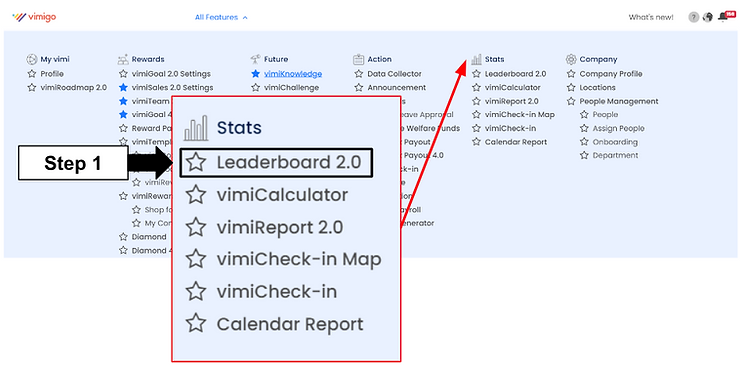
- Go to the "Leaderboard" top-nav page. Click "Leaderboard Setting".
- Find "Monthly vimiGoal" (or any other leaderboard you want to launch with).
- Change its status from "Disabled" to "Publish".
- Save.
- On the mobile app, staff can now open the "Leaderboard" tab and see rankings.
After this, staff see their rank against colleagues, and the top 3 get a push notification at the end of each period.
For Admins (Employer / HR / Manager)
How to enable a leaderboard for everyone
- Go to the "Leaderboard" page (top navigation).
- Click "Leaderboard Setting" (visible to admin and HR only).
- The settings screen lists every system leaderboard and its current status.
- Find the one you want to turn on (e.g. "Monthly vimiSales").
- Change the status to "Publish".
- Save.
To temporarily hide everything during a transition, use the bulk toggle to switch all system leaderboards off at once.
How to restrict a leaderboard to specific staff
Sometimes a leaderboard should only be visible to one team. A Sales leaderboard, for example, is irrelevant to Warehouse.
- In "Leaderboard Setting", open the leaderboard detail.
- Find the "Watchers" field.
- Enter the user IDs of the staff who should see it.
- Save.
All other staff will no longer see that leaderboard. To make it public again, clear the watchers list and save.
How to set a ranking limit (Top 10 only)
If you want to show only the top performers instead of the full list:
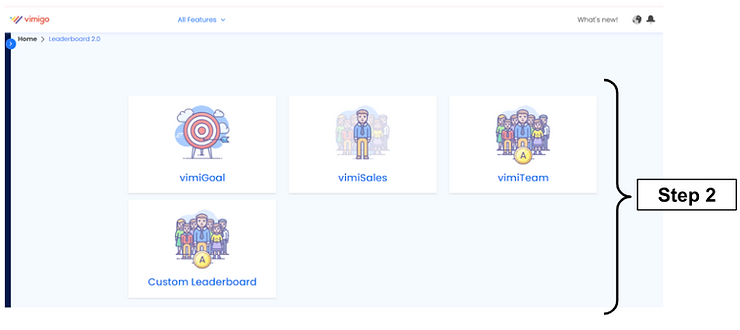
- Go to "Leaderboard" page → "Leaderboard Ranking Limit" card.
- Use the "Search Leaderboard" field to find the one you want, or pick from the module dropdown.
- Click "View" to load the list.
- For each leaderboard, use the "Leaderboard Ranking Limit" dropdown to choose "Top 3", "Top 5", "Top 10", or "All".
- Click "Save".
The mobile app and web will now show at most the chosen number of entries.
How to create a custom leaderboard for a campaign
Custom leaderboards are perfect for short-term competitions - "April Sales Sprint", "Ramadan Customer Service Challenge", "Q3 Team Goals".
- Go to "Leaderboard" page → "Custom Leaderboard" card.
- Click "Create New".
- Fill in:
- "Title" - e.g. "April Sales Sprint".
- "Description" - optional explanation for staff.
- "Module" - pick "vimiGoal", "vimiSales ($)", "vimiSales (QTY)", "vimiSales (DAY)", "vimiTeam ($)", "vimiTeam (QTY)", or "vimiTeam (DAY)".
- "Commission / Goals" - which specific goals or commission structures count.
- "Interval" - how often the leaderboard resets within the campaign: daily, weekly, monthly, etc.
- "Start Date" and "End Date" - the campaign window.
- "Participants" - leave blank for all staff, or select specific people.
- "Reverse Order" - set to Yes only if a lower score means better (rare).
- Set "Status" to "Publish" to go live immediately, or "Draft" to review first.
- Save.
How to duplicate a leaderboard for next quarter
Instead of rebuilding a campaign leaderboard:
- Open "Custom Leaderboard".
- Find the one you want to copy.
- Click the "Duplicate" action.
- A copy is created with "Draft" status and "(Copy)" in the title.
- Update the "Start Date" and "End Date" for the new period.
- Change status to "Publish".
How to view the admin ranking table
- Go to the "Leaderboard" page → click "vimiGoal" (or "vimiSales", or "vimiTeam").
- Use the tabs at the top to switch intervals: "Monthly vimiGoal", "Weekly vimiGoal", "Daily vimiGoal", "Quarterly vimiGoal", etc.
- Use the "By Month" / "By Year" / "Today" dropdown to pick the view period.
- Pick a specific month or year using the date picker.
- Use "All Department" to narrow to a specific team.
- Click "View".
The table shows "Position", "Name", "Dept.", "Access Right", and the relevant metric columns ("Completion Rate (%)" for vimiGoal, "Total Sales (MYR)" for vimiSales, etc.).
For Employees
How to view your rank
On the mobile app:
- Tap the "Leaderboard" tab in the bottom navigation, or open it from a module like vimiGoal.
- Your current rank shows at the top.
- Other staff are listed below in order.
How to filter by department
If your company has many departments:
- On the leaderboard screen, tap the department filter.
- Pick your department - e.g. "Sales".
- The list narrows to only that department.
What the up / down arrow means
Next to each rank you may see a small arrow with a number. That shows how many positions the person moved since the last period closed (e.g. since last month). Green upward = climbed. Red downward = dropped.
What leaderboards you'll see
Depending on what your company has enabled, you may see:
| Leaderboard | What it ranks |
|---|---|
| "Monthly vimiGoal" | Who completed the most of their monthly goals |
| "vimiSales ($)" | Top sellers by Ringgit Malaysia |
| "vimiSales (QTY)" | Top sellers by units sold |
| "vimiTeam ($)" | Top-selling teams by MYR |
| "Early Bird of the Day" | Who checked in earliest today |
| "Early Bird of the Month" | Most consistent earliest check-ins this month |
| "Highest Working Streak" | Longest run of working days without leave |
| "Wellbeing" | Longest run of days without sick leave |
| "Overall Attendance" | Attendance percentage this month or year |
| "Monthly Badge" / "Yearly Badge" | Most badges earned |
| "Monthly Knowledge" / "Yearly Knowledge" | Most knowledge items completed |
| "Highest Point Monthly / Yearly" | Most vimiRoadmap points accumulated |
| "Most Class A" | Most vimiClass Class A grades earned this year |
| "Top vimiClass (This Month, Live)" | Live ranking by this month's vimiClass score, updated as your team progresses. Shows each person's Class and score, and the period picker lets you browse any previous month's final standings |
| "Most Improved vimiClass (This Month)" | Ranks by how much each person's vimiClass score improved compared to last month - great for spotlighting momentum, not just top performers |
| "Top Performance of the Week / Month / Quarter / Year" | Task-level performance ranking |
| "Best Improver of the Week / Month / Quarter / Year" | Who improved the most vs last period |
Settings & Configuration
| Setting | What it does | Default | Where |
|---|---|---|---|
| Master module toggle | Hides all leaderboards when off. | On | Company module settings |
| Per-leaderboard status | Each leaderboard is "Disabled", "Draft", "Publish", or "Schedule". | Disabled | "Leaderboard Setting" |
| "Watchers" | List of user IDs who can see this specific leaderboard. Leave blank for everyone. | Blank | Leaderboard detail |
| Ranking limit | "Top 3", "Top 5", "Top 10", or "All". | All | "Leaderboard Ranking Limit" |
| Weekly tab toggle | Shows/hides the "Weekly vimiGoal" tab. | Off | Company settings |
| Daily tab toggle | Shows/hides "Daily vimiGoal" and "Daily vimiSales" tabs. | Off | Company settings |
Leaderboard statuses
| Status | What it means |
|---|---|
| "Disabled" | Hidden from everyone. |
| "Publish" | Live and visible to eligible staff. |
| "Draft" | Created but not yet live - useful for reviewing before publish. |
| "Schedule" | Auto-publishes when the start date arrives. |
Time windows
| Window | What you see |
|---|---|
| "Today" | Only today's data. |
| "This Month" | Current calendar month. |
| "This Quarter" | Current Q1 / Q2 / Q3 / Q4. |
| "This Year" | Cumulative for the current calendar year. |
| "This 6-Month Period" | Jan–Jun or Jul–Dec. |
| "Overall" | All data ever, no period limit. |
Why the reset matters
Monthly and weekly resets are not a bug - they are the point. If rankings never reset, staff who fall behind in January are permanently demoralised by March. With monthly resets, everyone starts fresh every 4 weeks. Someone who had a rough February gets a clean slate in March. That keeps people playing all year.
Yearly and "Overall" leaderboards still exist for when you want the big-picture view - they are best used for annual awards, not daily motivation.
FAQ
Q: A leaderboard is showing old data.
A: Leaderboard data is cached for speed. The cache refreshes automatically when the source module updates (e.g. a goal is approved). If you see stale data after a big change, wait a minute or two and refresh. If it still looks wrong, contact support - they can force a live recompute.
Q: The Early Bird leaderboard showed wrong results at the start of the month.
A: This used to happen when the 1st fell on a weekend. It was fixed in late 2025. If it happens again, check that your company's working-day schedule is configured correctly - the leaderboard uses that schedule to decide which days count.
Q: Two employees have the same score. Who ranks higher?
A: They share the same rank number. There is no tie-breaker rule - neither person is officially ranked above the other.
Q: An employee resigned but still shows on the leaderboard.
A: When someone is marked as resigned, a background job removes them from all leaderboards. It normally runs within minutes. If they are still there after a day, contact support.
Q: I enabled a leaderboard but nobody can see it.
A: Check two things: (1) does the leaderboard have a "Watchers" list set? If so, only those users see it - clear the list to make it public. (2) Is the master module toggle on?
Q: Why don't GoalTask leaderboards (Top Performance / Best Improver) send notifications?
A: By design. Those are secondary metrics and notifications would be too noisy. Only primary leaderboards (vimiGoal, vimiSales, etc.) send podium alerts.
Q: Can I make a leaderboard for just one specific goal?
A: Yes. Create a Custom Leaderboard, pick "vimiGoal" as the module, and select only that goal in "Commission / Goals".
Q: Will staff be demoralised if rankings reset every month?
A: The opposite. Resets are the key. A monthly reset lets people bounce back from a bad stretch - the "comeback psychology" is why staff keep engaging with leaderboards. Avoid using only yearly leaderboards for daily motivation.
Q: I turned on Diamond and don't see a leaderboard for it.
A: Diamond leaderboards (Monthly / Yearly / All Time) appear automatically once the Diamond 2.0 module is on for your company. Look in "Leaderboard" → "Leaderboard Setting" — there's a card for each, and they're enabled by default. If you don't want one of them visible to employees, toggle the card off.
Q: A test transfer is polluting our Diamond leaderboard. Can we exclude it?
A: No — Diamond leaderboards sum every positive credit in the period, with no per-transaction exclude flag. If you reverse the bad transfer with "Receive Diamond", it creates a separate negative transaction; the leaderboard sum only reads positive credits, so the original test transfer still counts. Two practical options: disable the Diamond leaderboard temporarily under Leaderboard Setting, or wait for the next period to begin so the bad data ages out.
Q: Why doesn't my former principal user show pool top-ups on the Diamond leaderboard?
A: The Diamond leaderboard celebrates diamonds your employees personally earned. When someone is your company's principal user, their diamond balance temporarily holds the company's distribution pool: admin top-ups, Lucky Wheel buy-ins, and returned-on-resign balances all land there. Those flows are pool custodianship, not personal performance, so they don't count toward leaderboard scores either during or after the user's principal tenure. If a former principal user has received diamonds normally as an employee after handing over the principal role, those receipts continue to count.
Related Guides
- vimiClass - feeds the "Most Class A" leaderboard and takes check-in data from the same source as "Early Bird".
- vimiCheckin - powers "Early Bird of the Day / Month" rankings.
- vimiLeave - source of "Highest Working Streak" and "Wellbeing" leaderboards.
- vimiKnowledge - activity here feeds the "Monthly Knowledge" and "Yearly Knowledge" leaderboards.
- vimiRoadmap - roadmap points drive the "Highest Point Monthly / Yearly" leaderboards.
- Diamond - diamond credits feed the "Diamond of the Month / of the Year / of All Time" leaderboards (default ON; toggle off in Leaderboard Setting if you don't want one of them visible).